Online hands-on courseAI Automation Website Building Course · 8 chapters 30 lessons
No coding needed
and you can also buildyour own website
No coding, no learning design, no outsourcing.Start with one sentence; when you finish the course you'll have your own URL and can start collecting leads and orders.Four stages and eight steps, from positioning and copy through generation and polish, all the way to connecting your own domain.
NT$5,500Early bird
Original price NT$12,800 · Activated right after you enroll, so you can start learning today- Ship a site on your own domain that can take payments
- No coding, no design skills, no outsourcing
- 8 chapters · 30 lessons · includes 50+ prompt templates
Day 3Five pages generated
Your website is being generatedGenerating your website
Day 2
Positioning sheetCompleted
Who it's for
What you want them to do
Three reasons to choose you
Day 6
Launch checklistYour domain
Domain connected
HTTPS is on
Submitted to search engines
Day 7
Start taking ordersWeek one
Form notification received
Booking slots available
Data starts building
Have you ever wondered"If only I had my own website
"If only I had my own website
and that's it.”
You have had this thought many times. It is not that you are not trying hard enough, and it is not that the thing is not good enough — it is that every time you go to build a site, you stop at the same place. And that place was somewhere you could have walked past on your own.
Tried five tools, still zero website
You have signed up for Wix, Framer, bolt, and Canva. All the time went into comparing tools, and the page that matters most has not moved.Sitting in front of a blank canvas, not knowing where to start
No positioning, no page structure, no color palette. Generating more versions is just guessing, because you haven't decided what to say yet.Draft finished, and you think that counts as launched
Still on the tool's subdomain, no custom URL, forms that never arrive. It doesn't exist anywhere.You asked an agency, and the quote stopped you cold
Starting at 35,000, two to six weeks of waiting, and three more days to change one button. Your product can't wait that long, and your budget shouldn't be spent that way.You want to learn solo, but every tutorial is about code
Those courses are written for engineers. You don't need to become an engineer — you need a sequence explained in your language.Imagine a website that belongs only to you
- Your business gets its own URL, a name you chose, not someone else's subdomain.
- Customers land on it and in five seconds understand what you sell, why they should come to you, and what to do next.
- Someone is browsing your site at midnight: forms submitted, bookings made, orders coming in, and you don't have to be online.
- You want to change a line, swap an image, or add a plan — do it yourself and see the result in thirty seconds, without asking anyone.
- More importantly, the skill stays with you. You can build the next product and the next service yourself.
This isn't a thought experiment. This is what you'll have when you finish the course.
“What you're missing isn't a better tool. It's a sequence you can follow to a finished result that actually looks good.”
If you don't want your site stuck at almost done, finish it in one goEarly bird NT$5,500 · Offer endsDecember 1, then the price goes up
See how the course teaches itWhether a site can sell is mostly decided by its visualsA polished, high-converting brand / product page,
A polished, high-converting brand / product page,
Built from three layers.
Most people think whether a site looks good is a matter of taste. It is not — it is a matter of assets and system. Understand these three layers and you can judge for yourself why a site is not working, instead of endlessly swapping templates.
L1PositioningDecide what to cover
L2VisualDecides how valuable it looks
L3ConversionDecides whether you get paid
Start by saying clearly who it is for and what they should do
State your audience and primary action in one sentence. Get this step right and every step after it gets easier; get it wrong and no amount of beautiful design will save it.
Assets decide everything: color, type, layout, and imagery
Customers are already pricing you in their heads before you finish talking. This course gives you complete visual sets: matched colors, type hierarchy, spacing rhythm, and realistic image direction. Apply them and it looks considered — no blank canvas, no design talent required.
Every section pushes people toward the same action
Headlines, trust, button placement, and form fields are all arranged around conversion logic. Forms, payment or booking, and analytics are wired up in one pass, so "looks good" becomes "can take money" and the site finally starts working.
These three layers are the backbone of the course, and once you get them you won't need to switch tools againEarly bird NT$5,500 · Original priceNT$12,800
Join the courseNo prerequisites
Four common barriers this course doesn't have
We'll spell out the hurdles you'll run into, then take them apart one by one.
No coding required
You don't need to read or write a single line of code. If you can type, you can do this.
No design skills needed
Pre-matched color, font, and layout combinations you can use directly, with no blank canvas to face.
No hosting to rent
Everything happens in the browser, with no servers to buy and nothing to install.
No need to clear your weekend
One hour of guided practice a day. Pause anytime and pick up right where you left off.
What you'll buildNine scenarios,
Nine scenarios,
Every one of them is something you'll actually run into.
This isn't a show-off demo. From "I have no idea where to start" to "someone places an order on my site in the middle of the night," these are the nine things you'll have built with your own hands along the way.
You don't know where to start
One sentence, and a site appears
A midnight inquiry you never saw
Your site keeps taking orders while you're offline
Your site is running · it's fine if you're offline
23:47Bride-to-be · Ms. LinBooking: 12/08 wedding shootNT$18,000
Today's totalNT$53,600
It breaks on mobile
Mobile version right the first time
Changing one word takes three days
Change one line, see it in 30 seconds
1 / 3 · you just describe what you need
›Change “We provide professional services” to “Wedding photography, three packages quoted the same day”
BeforeWe provide professional services
→AfterWedding photography, three packages quoted the same day
You don't know what makes a site sell
High-conversion layouts, ready to use
Afraid you'll miss something before launch
All 18 items checked one by one before launch
0 / 18 itemsChecking
Say who you are and what you sell in five seconds
On mobile, every button is within thumb reach
Test the form submission and confirm the email arrives
Test the payment or booking link once
Your own domain connected, HTTPS active
Submitted to search engines, analytics installed
You don't know where visitors come from
Social, payments, and notifications connected in one pass
LINE official accountInstagramFacebookYouTubeThreadsEmail notifications
Once the site is built, connect social, payments, and notifications, so you can catch visitors wherever they come from.
You're never sure if each step is right
Fifteen layouts, just pick one
You want to use your own URL
Go live on your own domain
your-domain.comConnected
HTTPS certificateActive
Search enginesSubmitted
Site analyticsInstalled
8chapters, all focused on one thing: actually building the site and getting it liveEarly bird NT$5,500 · Original priceNT$12,800 · Activated right after you enroll, so you can start learning today
Enroll directlyOut-of-the-box layout comparisonsFifteen design systems and website templates,
Fifteen design systems and website templates,
Just pick one and make it yours.
The full template library has 38 sets (20 new + 18 classic), all with source files. Below are 9 representative sets with the most distinct color schemes: pick one, swap in your content, and go live without starting from a blank canvas.


Templates + course + prompt library, all in one goEarly bird NT$5,500 · Original priceNT$12,800· You can start today
Join the courseBefore and after
Before the course, and after
Same task, different order, and the time, cost, and control are very different.
Learn it once and never ask anyone again on the next projectEarly bird NT$5,500 · Only50spots left
Join the courseIs this for you
Take 30 seconds to see if it's a fit
A fit for this course
- Digital product creators:Your product is ready to sell, but no page is working for you 24 hours a day. Give it its own sales page on launch day.
- Course instructors and training organizations:Your course is finished, but you're still taking signups one DM at a time? Put the selling points, price, and checkout on one page so learners can enroll on their own.
- Coaches, consultants, freelancers:One page that makes clear who you are, what you're worth, and how to start, then lets clients book or pay on the spot.
- Content creator:Your audience is already there; what's missing is a place to catch them. Turn viewers into subscribers, and subscribers into paying customers.
Not a fit for this course
- You want a finished website, not another skill to learn.This course teaches you to build the site yourself — your positioning, your copy, your domain, your control. If what you really want is to hand the whole thing to someone else and get a finished website, then do not buy this. Find an agency, really, that suits you better.
- You ask before you try. Every time.That is right, you have a full year of support, and a real person replies within 24 hours. But that support is for questions that truly matter: my checkout button does nothing, or which of these two positionings is stronger. Not for something a ten-second search would solve. If you plan to ask first and never try, this course is not for you.
- You buy courses to feel like you're making progress, not to actually build something.There are 6.5 hours of lessons here, and a website that only goes live if you do the work. If you are buying the feeling of "I invested in myself" and the first lesson will never open, keep your money.
Course outline
8 chapters · 30 hands-on lessons
Start with positioning and go all the way to launching on your own domain. Every chapter has a clear deliverable, so expand one to see what it will help you build.
01Rethinking site building: think it through before you buildAbout 21 minBuild the right site-building mindset first, then pick tools. This section decides whether the next eight chapters go smoothly.
01.1Rebuilding your site-building mindset: how to start learning AI site building and hands-on practice & tool selection prep
OutputThe right site-building path and tool listHands-on
02Use the AI business coach to nail your positioning and build a brand asset libraryAbout 48 minNail down your product positioning and offer first, then use Open Design to build out your brand visuals and assets.
02.1Work with the AI business coach to complete your product positioning and offer design
02.2Build a brand asset library
02.3Build your brand visual system with Open Design
02.4Rebuild the landing page with Open Design
OutputProduct positioning + brand asset libraryHands-on
03Four ways to build a site with AI: Agent, screenshot, template, and Claude DesignAbout 73 minEach of the four paths fits a different situation. Look through all of them, then pick the one that suits you best.
03.1Introduction and overview of 4 AI site-building methods
03.2Method 1: use an AI agent plus Skills to build a site fast
03.3Method 2: replicate a site fast with an AI agent plus a screenshot
03.4Method 3: generate a site fast with an AI agent plus a template
03.5Method 4: generate a site fast with Claude Design
03.6AI site-building design optimization ideas and tool resource library
OutputDeliverables compared across four methodsHands-on
04Landing page copy, premium visuals, and motion polishAbout 53 minGo from "it looks fine" to "I believe it and I'll act": copy, visuals, motion, and interaction all delivered together.
04.1How to write course landing page copy with Skills
04.2Premium visuals
04.3Image motion design
04.4UI motion and interaction polish
OutputA polished, interactive landing pageHands-on
05Six landing page scenarios: personal brand, product sales, corporate brandAbout 113 minutesOne page per conversion goal. Use the same set of brand assets to build pages for different purposes.
05.1Conversion goals and types for four landing pages
05.2Personal brand landing page - lead capture
05.3Personal IP landing page — webinar live format
05.4Personal brand landing page - consulting conversion
05.5Product sales landing page - virtual product
05.6Product sales landing page - ecommerce product
05.7Corporate brand landing page
OutputWorking landing pageHands-on
06Connect payments, capture leads, and take bookingsAbout 15 minFrom showcase page to business tool. The "connect payments with Portaly" section is live for now; 6.1 and 6.2 will be added once recording is finished.
06.1How to connect payments through Portaly and get paid easily
OutputA site that takes payments and collects leadsHands-on
07Deployment and backend: Vercel, Netlify, Supabase, GitHubAbout 40 minPut your site on a public URL and understand the backend and version control you will need for maintenance later.
07.1Fast deployment: hands-on launch on Vercel / Netlify
07.2Vercel & Netlify domains
07.3Supabase: backend capabilities and version management
07.4GitHub hands-on: from browsing projects to creating your own repository
OutputA live site on your own domainHands-on
08V0 vs. Base44: platform selection logic and hands-on practiceAbout 26 minKnow where to go next when one platform isn't enough.
08.1V0 & Base44: how to choose an AI site builder
08.2V0 hands-on: AI generates a visually striking site and deploys it to Vercel in one click
08.3Base44 hands-on: build a web app with an admin panel in one click
OutputSkills for a second platformHands-on
8chapters, split by the order of outputs
30video lessons, totalingAbout 6 hours 30 minutes
50+Prompt templates for planning, generating, and refining
18conversion checks, verified one by one before launch
30lessons all about one thing: getting your site actually liveEarly bird NT$5,500 · Original priceNT$12,800 · Activated right after you enroll, so you can start learning today
Enroll directlyYOUR INSTRUCTOR
Ethan breaks down the site-building workflow he uses every day
This course is not a roundup of other people's tool introductions; it turns the pitfalls we actually hit in content creation, websites, design, and data workflows into a hands-on path that non-engineers can follow.

200K+YouTube subscribers
120+AI tutorial videos
5 yearsContent creation experience
3 yearsHands-on AI experience
This course is not a roundup of other people's tool introductions; it turns the pitfalls we actually hit in content creation, research, websites, and data workflows into a hands-on path that non-engineers can follow.
Working with creators and one-person companies, I kept seeing the same wall: the product was done, but there was no page that could explain it well, catch customers, and start selling. The problem was never the product; it was the missing page.
So I organized what I know into one complete framework: product positioning, website blueprint, visual system, AI site building, payments, and deployment. Not scattered tips, but a clear path from finishing the product to the first sale.
See Ethan's work on YouTube ↗What they builtNot a demo site,
Not a demo site,
They're websites that really take orders.
Three different industries, three different approaches. They all used to think "I can't code" too.
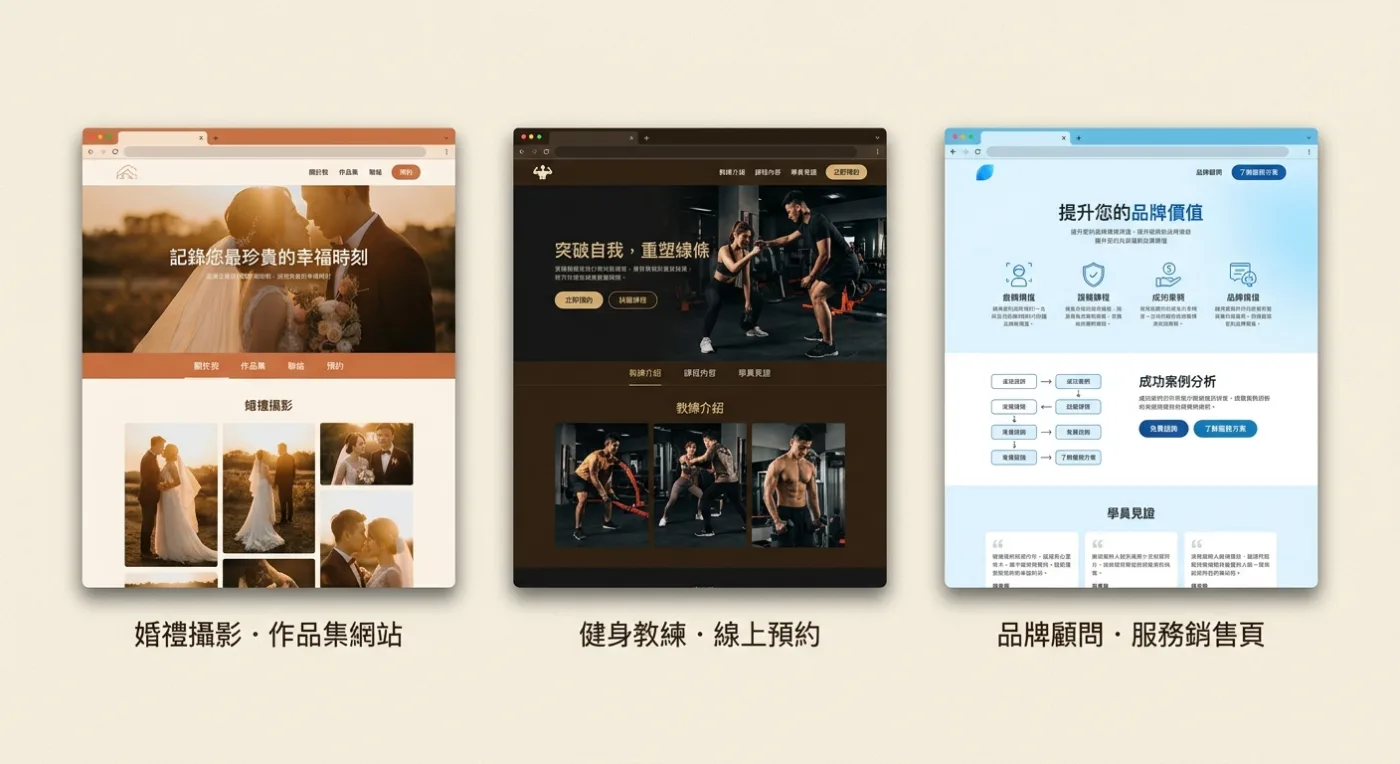
Wedding photographer · Portfolio + booking
Freelance work used to come through IG DMs, and the package and price had to be explained again every time. Now clients look at the work themselves, pick a package themselves, and fill in the booking form themselves.
14 bookings in the third week after launchFitness coach · Online booking system
Put the trial class, monthly plans, and schedule on one page so clients stop asking whether you have openings.
Consultation volume grew 2.2xBrand consultant · Service sales page
Your services go from a PDF to a page that speaks for itself, so clients have already read it before the proposal.
Sales cycle shortened from 3 weeks to 9 daysThey couldn't code either, they just started buildingEarly bird NT$5,500 · Original priceNT$12,800 · Activated right after you enroll, so you can start learning today
Join the coursePeople building alongside youWhen you're stuck,
When you're stuck,
Someone you can ask.
For a full year, a real person replies within 24 hours, plus a group of people building websites at the same time as you. No dumping a pile of links on you; answers are specific to your work.

What else you can do once you've learned itThe same approach,
The same approach,
You can build these too.
You learn a method, not a single template. When you need to drive traffic, run an event, or test a customer idea, the same approach lets you build another one.
WHAT YOU GET
Nine entitlements in one purchase
It's more than course videos. Everything you need from starting the build to life after launch is in here.
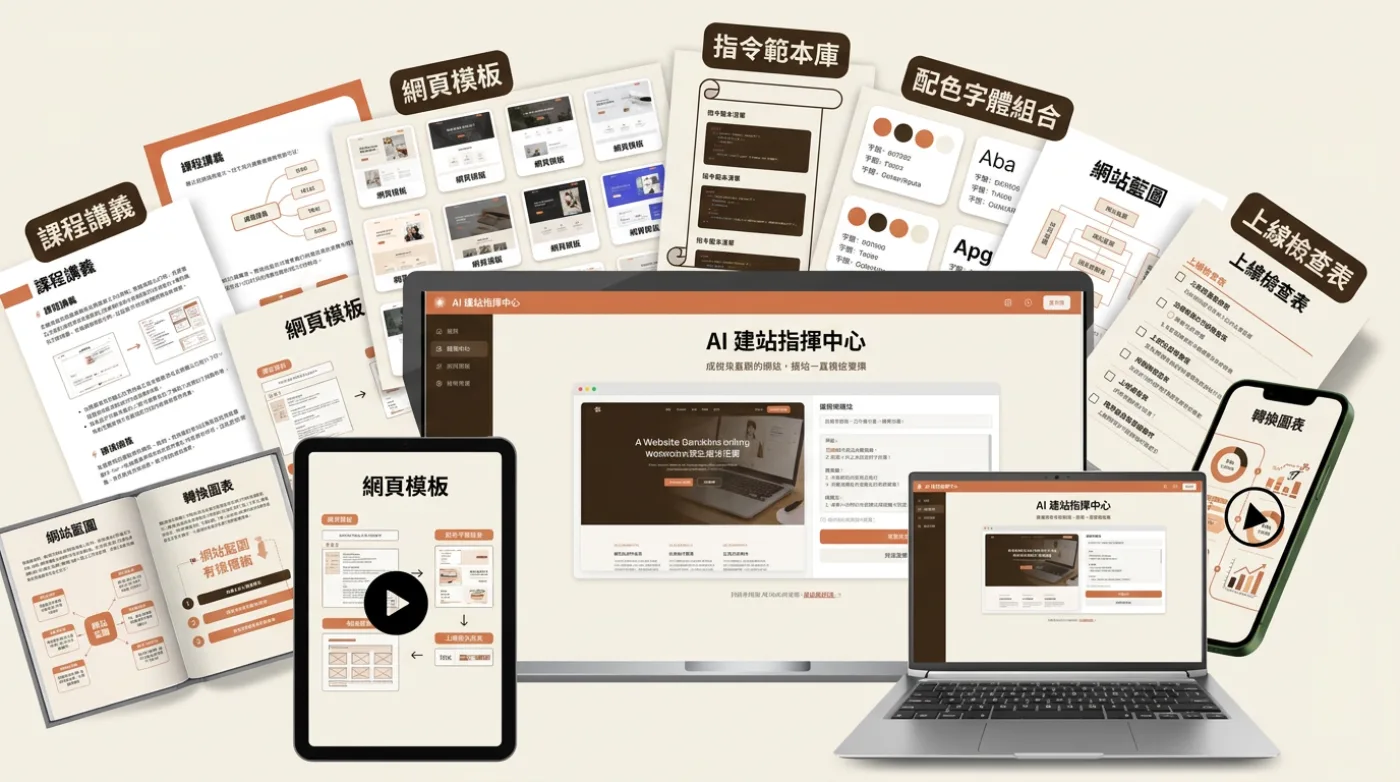
All of it in one goTotal combined value NT$40,400
All tools, templates, and spreadsheets in one go, activated right after you sign up.
NT$5,500Get it all today
Join the course01NT$9,800
8 chapters, 30 lessons, hands-on course (about 6 hours 30 minutes)
All pre-recorded, so you can watch it in one sitting or across ten. From positioning and blueprint to generation, refinement, and launch, every lesson maps to something you have to hand in.
02No expiration
Lifetime access
No time limit, never expires. Come back to the demo anytime when your next product is ready to launch.
03NT$7,200
38 design systems and website templates
Portfolio, service booking, single-product sales page, pricing plans, content blog, brand home page — every direction gives you a complete layout. Copy it and change it to yours.
04NT$4,800
50+ AI prompt template library
Planning a website, generating pages, refining visuals, writing copy — every one comes with a ready-made prompt. Copy, paste, and run; you do not have to figure out how to ask.
05NT$3,600
Color and font pairing library
Twenty-four prebuilt color and font pairings, each with when to use it. Apply one and it looks polished, no design talent required.
06NT$2,400
Website blueprint and positioning sheet
Fill in "who it's for, what you want them to do, and which pages exist" before you start building. Complete the four sheets and the generated site will be far more accurate.
07NT$1,800
18-point launch checklist
Forms, payment, mobile version, HTTPS, search engines — check each one before you open up. Don't find out what you missed after launch.
08NT$4,800
Conversion audit + one personalized system audit
Which numbers to watch after launch and where to change things when you spot a problem. The instructor also runs a full diagnosis of your site and tells you exactly what to change.
09NT$6,000
1 year of personalized support + 12 months of update coverage
If you get stuck, send a screenshot over and someone responds to your actual work within 24 hours. When AI tools change, the course updates with them, so one purchase keeps you on the latest version.
One purchase covers all eight items, with no extra chargeEarly bird NT$5,500 · Original priceNT$12,800
Join the courseEnrollment infoJoin now,
Join now,
You can start today.
Two versions, the same complete course. The difference is whether you want a support layer with you all the way to launch.
Course-only
Course only · set your own pacePeople who already have their own rhythm and want the full method to finish on their own.
NT$3,980Early bird
Original price NT$9,800 · Early bird saves NT$5,820- 8 chapters · 30 complete hands-on lessons
- 50+ prompt templates and a layout reference library
- 7-day money-back guarantee — full refund before you watch any paid lessons
- Lifetime replay · content keeps getting updated
You'll complete: a product page that can introduce, share, and be used to take on clients or collect payments.
ChooseCourse-onlyCoaching edition + 38 design systems and website templates
Support tier included · we stay with you to launchYou're building your first site and want someone alongside you to actually get it live.
NT$5,500Early bird
Original price NT$12,800 · Early bird saves NT$7,300 · Only 50 spots left- Course-onlyin full
- 24/7 human support for a full year
- Chapter-by-chapter feedback on your real site
- Pre-launch site review + conversion diagnosis
- A learner community, building alongside people at your stage
- Client delivery pack: quote templates, contract essentials, SOPs
You'll finish with a site on your own domain that can take payments and was reviewed before launch.
Join the courseThe price changes as the course progressesThe earlier you join, the better the price. Here is the pricing timeline for both versions.
Now
5,500
Before 12/30Course version 3,980Next phase
7,980
12/30 – 2/28Course version 4,980Original price
9,980
After 2/28Course version 6,980↑Joining now is the cheapest it will be. If prices change you won't pay the difference, and upgrading later only costs the price difference.
Activated right after you enroll, so you can start learning today · Group pricing available for 3 or more
FAQ
What you need to know before you start
Yes. The course starts with creating an account. Most learners have never touched a website tool before they begin, and they finish by following along.
Don't let good ideas stop at "I thought about it"Your website,
Your website,
You can start today.
Many people have thought about building a website, but the day they actually start never comes. Enroll and you are activated today, moving at your own pace with real people alongside you.
Secure checkout · start learning right after payment
Access is activated as soon as you sign up, with lifetime viewing. You can request a full refund within 7 days before viewing any paid unit.