Online hands-on courseClaude Code · Hands-on course · 7 chapters
Claude Code
From Beginner to Pro Hands-On Course
An AI agent installed on your own computer and running in the terminal. It can read your project files and working folders, carry out the jobs you hand it, write scripts and documents, and schedule repetitive workflows to run automatically every day. No coding background required: you give instructions in plain English, it plans before it acts, and all you do is sign off.
$59Early bird
Original price $297 · One-time payment · Lifetime accessAssigned today
What you delegateSay one sentence and it gets to work
Three meetings → one deck
30 photos → posts scheduled
New orders → a daily report
Handed to youDone on your own computer
Meeting deck
Order report
It reads your project folder
Your project files
Brand materials and tone
Your usual workflows
Three things it will do
Understands your materials
Actually finished end to end
Set it once
What you no longer have to do
Organizing data by hand
Rebuilding the same thing
Checking progress daily
01Install it
02Give it data
03Hand off the first task
04Then it runs itself
THE PROBLEMThe problem isn't that you're trying hard enough.
The problem isn't that you're trying hard enough.
It's that you're still finishing every step by hand.
AI is not too weak; it only works when you speak up first. That is exactly what this course addresses: hand off the repetitive processes and keep only the parts that need judgment.
You don't code, so you assume Claude Code isn't for you
The terminal intimidates you, so you assume AI agents are only for engineers — that barrier is imaginary.AI hands you the output, but you still have to process it yourself
AI helps you think, but you're still the one doing the work: copying, pasting, formatting, sending. That isn't automation.More tools learned, no real change in output
ChatGPT, Gemini, and Copilot are all isolated tools that never connect into an automation system that actually runs.Your AI only works when you ask it to
The moment you stop typing, it stops working — that's manual operation, not automation.Tutorials are too technical to follow, or too shallow to learn anything from
Courses written by engineers for engineers are hard to follow, and surface-level ones don't solve your real work problems."The problem isn't that you don't work hard enough, it's that you never builtAI agent systems thinking. This course exists to solve that root problem.”
Tools don't become a system on their own. You need someone to walk you through wiring up the whole workflowEarly bird $59 · Access activates right after payment
See how the course teaches itTHE SOLUTION
From conversation to automation: the complete trilogy
These three modules are the backbone of this course: first turn conversations into repeatable instructions, then move AI into your desktop workflow, and finally let it run tasks on its own.
01Conversation with The BrainAbout 35 minutes
02Collaboration: The Co-WorkerAbout 30 minutes
03Automation: The BuilderAbout 45 minutes (the main event)
Claude Opus 5.5 brain upgrade
Most people use AI by asking it questions. This module teaches you to communicate with Claude through a chain of command, building a prompt structure you can repeat and upgrade.
Claude Cowork desktop collaboration workflow
Move Claude from the browser onto your desktop. Through Skills, Plugins, and local file integration, embed AI directly in your workflow and trigger your SOPs with one click.
Claude Code in practice: build automation with a terminal agent
Direct a terminal AI in plain language and let it run tasks, build tools, and operate on a schedule. This is the part where efficiency genuinely changes shape.
Reads your project, executes, and runs on its ownEarly bird $59 · Course structure: 7 chapters
Join the courseA DAY IN YOUR WORKFLOW
A day of automation, your day
What makes the difference is not how smart it is but that once the schedule is set, it keeps running, including while you are in meetings, off work, or asleep. On any given day, the work you did less of is the work Claude Code finished for you.

07:00
You're not even up yetThe scheduled automation has already run, and the daily report is sitting in your Notion waiting for you to review it.
09:00
Your next instructionDescribe the goal clearly in natural language and it plans before it executes, instead of tossing you a block of code.
12:00
You're busy with other thingsHand the repetitive sorting, comparing, and compiling to it, and only handle the few items that need judgment.
18:00
Time for routine workThe cron job starts itself. You don't have to remember it anymore.
22:40
You're already off workSchedules and automations keep running. Just check the results the next morning.
WHAT YOU CAN BUILD
After finishing, these are the three kinds of things you can build with Claude Code
The value of Claude Code is not that it can chat, but that it can read your project, change files, and connect to the tools you already use, turning the processes you repeat into systems you can run over and over.
Content and research automation
Topic selection, benchmarking, research, and first drafts — let it run the whole content pipeline once first.
- Build your personal content context and brand visual guidelines
- Market research, breakout content, and benchmark analysis
- Collect, summarize, and sort data with less copy-pasting
Office and team collaboration
Documents, spreadsheets, and your knowledge base in one shared context: look things up as needed, without interrupting anyone.
- Organize documents and spreadsheets with Claude Cowork
- Lark, Google Sheets, and knowledge base collaboration
- Workflows for market research and competitor analysis
Automated workflows and delivery
Turn a workflow that worked once into a template and Skill, so you can replicate it quickly on the next task.
- Connecting MCP tools and how Hooks trigger
- Scheduled automatic runs with Cron / Vercel Cron
- Websites and sales pages, from brief to launch
Hand off the repetitive work first so you can free up timeEarly bird $59 · Course structure: 7 chapters
Join the courseWHAT YOU WILL BUILD
After this course, these are the six things you can build with Claude Code
Each tile below is a hands-on project from the course. Work through them and these screens will appear on your own computer.
Daily at 08:00Spending time sorting email every day
Today's summaryNeeds your callArchived
Today's summaryCustomer inquiries sorted into three categories and written to Notion
Needs your call3 things that need your own reply
ArchivedThe rest auto-sorted
Automated email → Notion daily report
Claude Code + Skill automatically reads your inbox every morning, distills the key points, and pushes them to Notion and Slack, so you are never held hostage by your inbox again.
Right after the briefA landing page means booking an engineer for two weeks
briefLayoutCopyGo live
briefProduct, audience, and the problem to solve
LayoutHero, benefits, pricing, and FAQ sections
Go liveDeployed and ready to take orders
One sentence → launch your landing page
Tell Claude Code what you want to sell and it produces the page structure, color scheme, copy, and SEO settings, then deploys it live, so all you do is collect the orders.
When you need contentOne video means editing, voiceover, and publishing all on your own
ScriptVoiceoverSubtitlesPublish
01:12
1 long video3 short videosSubtitles synced
Video content pipeline: script → voiceover → short video
Give it a topic and it produces the script, voiceover, captions, and short-video versions, then schedules the publishing flow. The part content creators feel most.
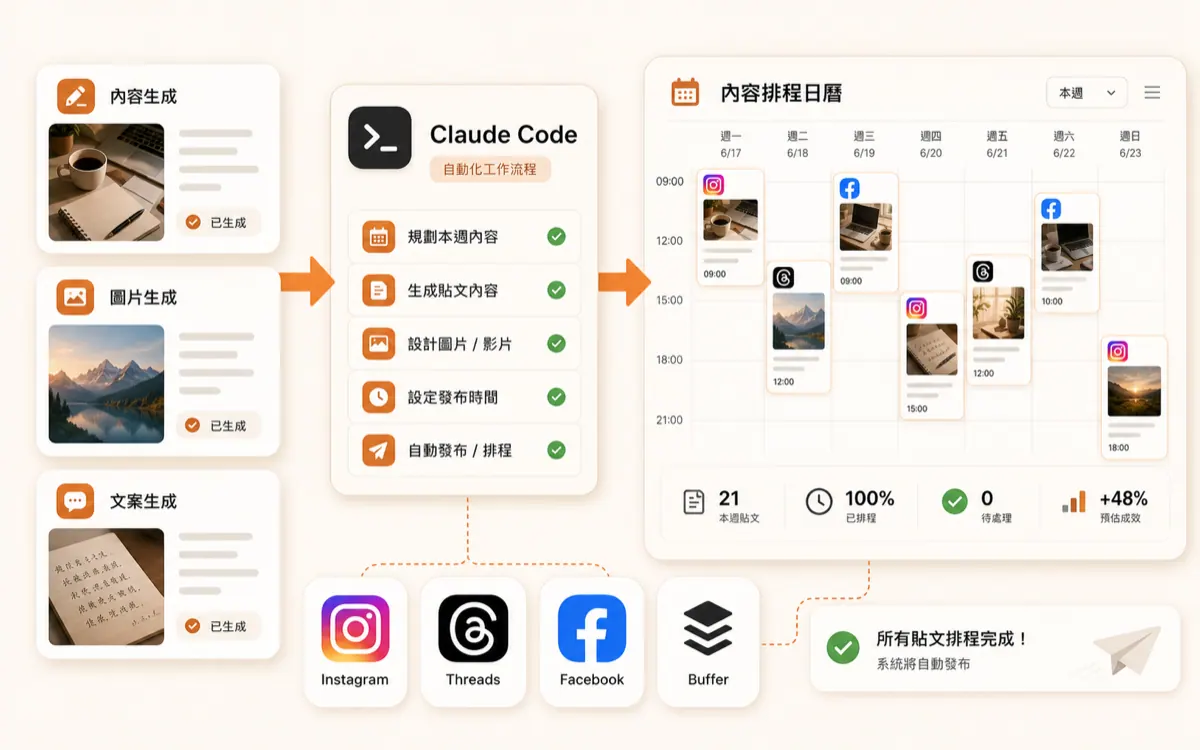
Weekly content prepEvery social post means writing copy, choosing images, and picking a time slot
Tuesday 20:00 · IG postThursday 12:30 · Threads postSaturday 21:00 · Instagram post
Automated social content scheduling
Set a topic direction and it automatically generates a week of post copy and image prompts, then schedules the posts, so you're not racking your brain every day.
Every morning at 07:00Competitor tracking is all manual, so news always arrives lateA competitor adjusted plan pricing and added a free trial; keyword ranking rose 6 spots
OverviewCompetitorsKeywordsIssues
MonTueWedThuFriSatSun
Daily automated competitor and keyword monitoring report
Automatically pull the latest updates from the sites and communities you specify every day, distill the key changes, and push them to your Slack or email, so the intelligence comes to you.
When support volume growsYou answer the same customer questions again and again, and the FAQ is never done
Conversation logsFAQKnowledge gaps
WarrantyTwo years on the device, three months on consumables; accidental damage isn't covered
ShippingShips within two business days of your order, with a tracking number
Human handoffPricing exceptions and custom requests always go to me personally
AI support knowledge base and auto-replies
Use Claude Code to turn your product documents and FAQs into a knowledge base, connect it to automated replies, let it catch repeated questions first, and route anything out of scope to you.
In the course, you build each of these screens one by oneEarly bird $59 · One-time purchase · lifetime access
See the full curriculumBEFORE / AFTER
What's the difference
This isn't about turning you into an engineer. It's about handing off the repetitive work that is bound to happen, so you only do what needs judgment.
Before
- AI is just a chat tool, so you retype everything each time
- The terminal intimidates you
- Tools sit in isolation and never connect into a system
- When the AI stops, the work stops
- Lots of time spent to save a few spare minutes
You: sorting your inbox by hand each morningYou: Copy-paste the AI output, then format itYou: forget to run it and the data is missing
After
- Trigger commands and Skills in one click to run your SOP automatically
- Direct your terminal in natural language, no coding required
- Chat, desktop collaboration, and automation wired into one system
- Runs on schedule and keeps going when you're away
- Turn the process into a template you can reuse on other tasks
Claude Code: finished at 08:00, daily report already in NotionClaude Code: draft, format, and check in one passCron Job: the schedule keeps running, and the results wait for your review
Go from doing everything yourself to only handling what needs judgmentEarly bird $59 · Access activates right after payment
This is exactly what I wantIS THIS FOR YOU
Take 30 seconds to see if it's a fit
A fit for this course
You give the instruction → Claude Code plans, then executes → you review
- Knowledge workers who process the same information every day
- Founders and freelancers who want AI to stand in for headcount
- Marketers, operators, and content creators who want to produce faster
- Curious about Claude Code but not sure where to start learning
- You want AI to work proactively, not just answer when asked
Not a fit for this course
Just watching · Not hands-on · Expecting a one-click fix
- Already an advanced Claude Code user with a development background
- Not willing to spend 10 minutes following the hands-on exercise
- Looking for a zero-learning-curve, one-click magic tool
- Not interested in AI tools at all, just want to watch where the market goes
If those items on the left describe you, you can start todayEarly bird $59 · Access activates right after payment
Yes, sign me upCURRICULUM
7 chapters · 42 hands-on lessons
Matches the syllabus published in the learner dashboard (7 chapters, 42 sections). CH1 covers getting started fast and using it safely, and CH5 through CH7 cover automation, delivery, and templates; expand any chapter to see what it will walk you through building.
1.1|What Claude Code is: from chat tool to work agent
1.2|Installing the Claude Code CLI and your first launch
1.3|Connecting the Claude desktop app and Claude Code CLI to third-party APIs
1.4|Common Claude Code commands
1.5|Advanced and custom commands: turn Claude Code into your working system
1.6|How to configure Chinese language settings in the Claude desktop app, plus a tutorial on connecting third-party LLM APIs
42published lessons, 7 chapters from installation, CLI, and MCP to automated delivery
0Coding background needed to direct your terminal in natural language
24/7Runs automatically on schedule, even when you're away
LifetimeViewing period, including future course updates
All seven chapters revolve around one thing: turning Claude Code into your own working systemEarly bird $59 · One-time purchase · lifetime access
Enroll directlyINSTRUCTORView the YouTube channel @TikTokEthan ↗
Ethan breaks down the Claude Code workflows he uses every day for you
This course is not a roundup of other people's tool introductions. It takes the pitfalls actually hit in content creation, research, websites, data organization, and automated workflows and turns them into a hands-on path that non-engineers can follow.
200K+YouTube subscribers
120+AI tutorial videos
5 yearsContent creation experience
3 yearsHands-on AI experience

WHAT THEY SAY
Hear from the early movers
Here's what people who have already put Claude Code to work mention most often after finishing the course.
WHAT YOU GET
Here are the six things you actually get
It's not just video. Every item is something you can open and use the moment the course ends.
7 chapters of hands-on video lessonsThe complete path from installation, CLI, MCP, and Skills to automated delivery
Course templates and prompt assetsTurn your best prompts and workflows into reusable assets
Four hands-on case typesContent creation, data research, website sales pages, and scheduled tasks
One-time purchase, lifetime viewingWatch published units right away, no monthly subscription
Later updates unlock automaticallyCourses are updated periodically, and new units are added to your course home
In-platform learner Q&AThere's a place to ask about accounts, access, and learning paths
200K+Instructor's YouTube subscribers
120+AI tutorials published
7Hands-on chapters
LifetimeAccess period, including future updates
Six deliverables in one purchase, start the same day you payEarly bird $59 · Original price $297
Join the coursePRICING
One-time purchase, lifetime access
Course access opens as soon as payment succeeds. Sign in with the email you used at checkout and you can start right away.
Early bird offer
Original price $297$59One-time payment · lifetime access
Access is activated immediately after payment; you can request a refund within 7 days as long as you haven't watched a paid lesson.
- 7 chapters of hands-on video lessons|The complete path from installation, CLI, MCP, and Skills to automated delivery
- Course templates and prompt assets|Turn your best prompts and workflows into reusable assets
- Four hands-on case types|Content creation, data research, website sales pages, and scheduled tasks
- One-time purchase, lifetime viewing|Watch published units right away, no monthly subscription
- Later updates unlock automatically|Courses are updated periodically, and new units are added to your course home
- In-platform learner Q&A|There's a place to ask about accounts, access, and learning paths
7-day money-back guaranteeYou can request a refund within 7 days as long as you haven't watched any paid lessons.
Prices include tax. Refunds follow the platform policy. Course content is updated continuously, and published units are available to watch right away. This course has no affiliation, partnership, agency, or endorsement relationship with Google, Meta, Anthropic, Claude, OpenAI, or any other third-party platform; tools and platforms mentioned on this page are used only for teaching and examples.
FAQ
You might want to ask before you start
The free video is a good way to see what Claude Code can do; this course focuses on hands-on processes you can repeat. The course breaks down everything Claude Code can do (content, web pages, organizing data, building automation workflows), including setup, common mistakes, prompt thinking, and examples you can follow step by step. You're not buying a tool introduction; you're buying a hands-on roadmap that skips the detours.